
Welcome to VoxPria! 🎉
Thank you for choosing VoxPria, the AI-powered voice communication platform designed to help businesses automate customer conversations, reduce costs, and scale effortlessly. Whether you’re sending appointment reminders, conducting surveys, or building intelligent voice assistants, VoxPria makes it simple.
What is VoxPria? #
VoxPria is an all-in-one AI voice platform that enables you to:
- Create Voice Campaigns – Send automated calls to thousands of contacts
- Build AI Voice Agents – Deploy intelligent bots that understand and respond naturally
- Automate Workflows – Connect calls, SMS, webhooks, and integrations
- Manage Communications – Track calls, analyze performance, and optimize results
Your Dashboard at a Glance #
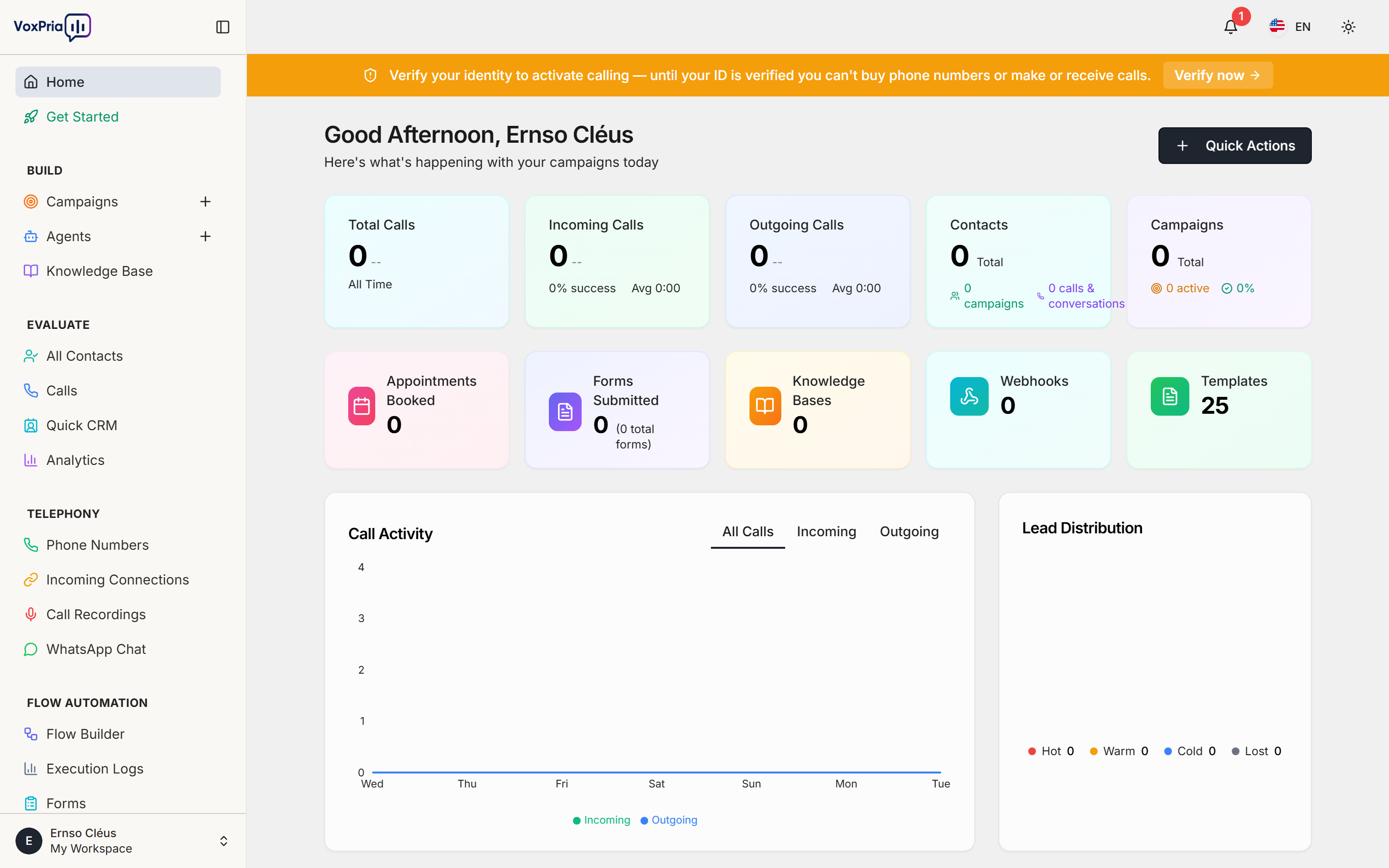
When you log into VoxPria, you’ll see your Dashboard – your central command center. Here’s how to navigate:
📍 How to Access Your Dashboard #
- Log in to your VoxPria account at
https://app.voxpria.com - You’ll automatically land on the Home Dashboard
- Find it anytime in the left sidebar: Click “Home Dashboard”
Understanding the Main Navigation #
Your left sidebar is organized into 5 main sections based on what you want to accomplish:
🔨 BUILD Section #
This is where you create and configure everything:
- Campaigns – Create voice or SMS campaigns to reach your contacts
- Agents – Build AI voice agents that can answer calls intelligently
- Templates – Use pre-built templates to speed up campaign creation
- Knowledge Base – Train your agents with information they need to know
- Voices – Choose from dozens of natural-sounding voices in multiple languages
💡 Example: To create your first campaign, go to BUILD → Campaigns → Create New Campaign
📊 EVALUATE Section #
This is where you monitor and analyze your results:
- All Contacts – View and manage all your contact lists
- Calls – See call history, recordings, and transcripts
- Quick CRM – View and manage your CRM based on status
- Analytics – Track campaign performance, success rates, and insights
💡 Example: To see how your campaign performed, go to EVALUATE → Analytics
📞 TELEPHONY Section #
This is where you manage phone numbers and incoming calls:
- Phone Numbers – Purchase and manage your VoxPria phone numbers
- Incoming Connect – Route incoming calls to agents or flows
💡 Example: To buy a phone number for your business, go to TELEPHONY → Phone Numbers → Purchase Number
⚡ FLOW AUTOMATION Section #
This is where you build advanced automations:
- Flow Builder – Create visual workflows that connect calls, SMS, webhooks, and more
- Execution Logs – Debug and monitor your automation flows
- Webhooks – Connect VoxPria to your CRM, database, or other tools
- Forms – Collect information during calls
- Appointments – Schedule and manage appointments
- Flow Templates – Use pre-built automation templates
💡 Example: To create an automated appointment reminder flow, go to FLOW AUTOMATION → Flow Builder → Create New Flow
💳 BILLING Section #
This is where you manage your subscription and payments:
- Upgrade Plan – View available plans and upgrade your account
- Billing & Credits – Add credits, manage payment methods, view balance
- Transaction History – Review all your past transactions and invoices
💡 Example: To add more calling credits, go to BILLING → Billing & Credits → Add Credits
Key Concepts to Understand #
Before diving in, here are the most important concepts in VoxPria:
🎯 What is a Campaign? #
A Campaign is an outbound communication effort where VoxPria automatically calls or texts a list of contacts. Perfect for:
- Appointment reminders
- Payment reminders
- Survey calls
- Event notifications
- Marketing outreach
🤖 What is an Agent? #
An Agent is an AI-powered voice assistant that can have natural conversations with your contacts. Agents can:
- Answer incoming calls 24/7
- Make outbound calls in campaigns
- Understand questions and respond intelligently
- Transfer to humans when needed
- Collect information through conversation
⚙️ What is a Flow? #
A Flow is a visual workflow that automates actions based on triggers. For example:
- When a call ends → Then send follow-up SMS → Then update CRM
- When form submitted → Then schedule appointment → Then send confirmation
📚 What is Knowledge Base? #
The Knowledge Base is where you upload information (FAQs, product details, policies) that your AI agents use to answer questions accurately.
Your First Steps #
Ready to get started? Here’s what to do next:
- Explore Your Dashboard – Click through each section to familiarize yourself
- Create Your First Campaign – Follow our Quick Start: Your First Campaign in 5 Minutes guide
- Choose a Voice – Browse available voices in BUILD → Voices
- Add Contacts – Import your contact list in EVALUATE → All Contacts
- Launch Your Campaign – Send your first automated calls!
Need Help? #
We’re here to help you succeed! Here’s how to get support:
- 📚 Documentation – Browse our complete help center (you’re already here!)
- 💬 Live Chat – Click the chat icon in the bottom-right corner
- 📧 Email Support – support@voxpria.com
- 🎥 Video Tutorials – Watch step-by-step guides in each section
Quick Tips for Success #
- ✅ Start small – Test with 10-20 contacts before scaling up
- ✅ Use templates – Save time with pre-built campaign templates
- ✅ Test your voice – Call yourself first to hear how it sounds
- ✅ Check analytics – Monitor performance and optimize
- ✅ Train your agents – Better knowledge base = better conversations
🎉 Congratulations! You now understand the VoxPria platform. Ready to create your first campaign? Let’s go!
Next Article: Understanding Your Dashboard


