
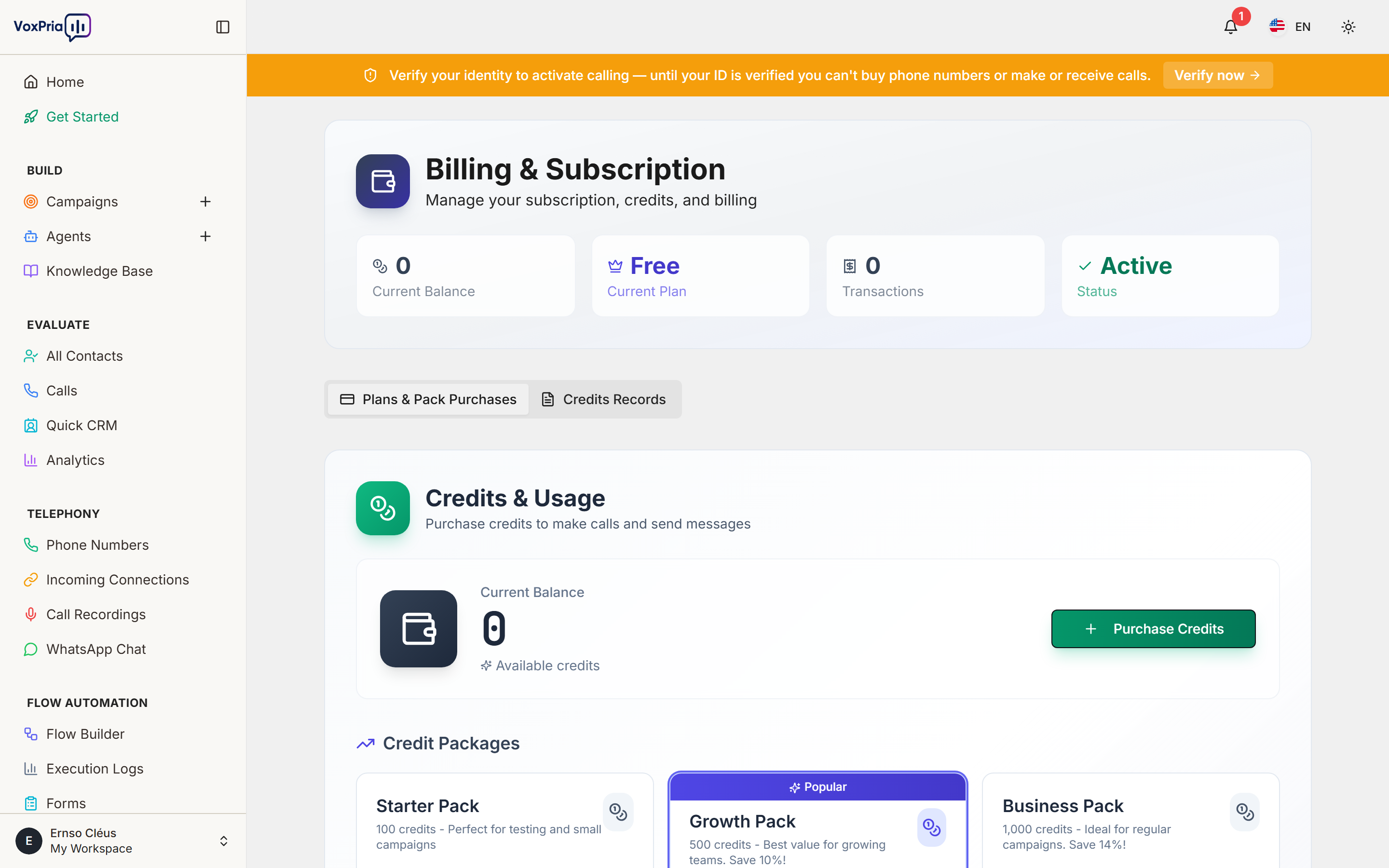
Understanding how billing works helps you budget effectively. Moreover, knowing credit costs prevents surprises. In this guide, we’ll explain everything about VoxPria billing and credits.
How Credits Work #
VoxPria uses a credit-based system for billing. Additionally, credits are consumed as you use platform features:
What is a Credit? #
One credit equals approximately $0.01 USD. Furthermore, credits are purchased in packages and never expire.
Credit Costs #
Different actions consume different amounts of credits. Moreover, understanding costs helps you plan campaigns:
Voice Calls: #
- US/Canada: 1-2 credits per minute
- UK: 2-3 credits per minute
- Other Countries: Varies (3-10 credits per minute)
- Minimum: 1 credit per attempt (even if not answered)
SMS Messages: #
- US/Canada: 1 credit per message
- International: 2-5 credits per message
Phone Numbers: #
- Local Numbers: 10 credits per month
- Toll-Free Numbers: 20 credits per month
Other Features: #
- AI Training: Free (included)
- Recordings: Free storage for 90 days
- Transcripts: Included with calls
- Analytics: Free (unlimited)
Checking Your Balance #
Your credit balance is always visible. Additionally, you can view detailed usage:
- Look at top-right corner – balance shows there
- Or go to BILLING → Billing & Credits
- See:
- Current balance
- Usage this month
- Projected monthly spend
- Credit history
Purchasing Credits #
Adding credits is quick and easy. Furthermore, larger packages offer better value:
- Go to BILLING → Billing & Credits
- Click “Add Credits”
- Choose package:
- Starter: 1,000 credits – $10
- Growth: 5,000 credits – $45 (10% bonus)
- Business: 10,000 credits – $85 (15% bonus)
- Enterprise: 50,000 credits – $400 (20% bonus)
- Enter payment information
- Complete purchase
- Credits available immediately
Payment Methods #
VoxPria accepts multiple payment methods. Moreover, all payments are secure and encrypted:
- Credit Cards: Visa, Mastercard, Amex, Discover
- Debit Cards: Most major debit cards
- PayPal: Link your PayPal account
- Wire Transfer: For enterprise purchases ($5,000+)
Auto-Recharge #
Never run out of credits with auto-recharge. Additionally, this ensures uninterrupted service:
- Go to BILLING → Billing & Credits
- Click “Enable Auto-Recharge”
- Set:
- Trigger Amount: When balance drops below X credits
- Recharge Amount: How many credits to add
- Payment Method: Which card to use
- Save settings
Example: When balance drops below 500 credits, automatically purchase 5,000 credits.
Transaction History #
View all credit purchases and usage. Furthermore, export for accounting:
- Go to BILLING → Transaction History
- See all transactions with:
- Date and time
- Transaction type (purchase, usage, refund)
- Amount
- Balance after transaction
- Invoice number
- Filter by date range
- Export as CSV or PDF
Invoices #
Get detailed invoices for all purchases. Moreover, invoices are suitable for business accounting:
- Go to BILLING → Transaction History
- Click on any purchase
- Click “Download Invoice”
- PDF invoice includes:
- Your company information
- VoxPria billing address
- Invoice number and date
- Itemized charges
- Payment method
- Tax information (if applicable)
Usage Tracking #
Monitor where credits are being spent. Additionally, this helps optimize costs:
- Go to BILLING → Billing & Credits
- Click “Usage Breakdown”
- See credits used by:
- Campaign
- Date range
- Feature type (calls, SMS, numbers)
- Country/destination
- Identify highest costs
- Optimize expensive campaigns
Low Balance Alerts #
Get notified before running out of credits. Furthermore, this prevents campaign interruptions:
- Go to BILLING → Settings
- Set alert threshold (e.g., 500 credits)
- Choose notification method:
- Email notification
- SMS alert
- Dashboard warning
- Save preferences
Refunds & Credits #
VoxPria has a fair refund policy. Moreover, issues are handled quickly:
- Unused Credits: Refundable within 30 days of purchase
- Service Issues: Credits refunded for platform outages
- Failed Calls: No charge for calls that fail due to platform issues
- Billing Errors: Corrected immediately upon report
Contact support at billing@voxpria.com for refund requests.
Best Practices #
- ✅ Monitor Balance – Check daily during active campaigns
- ✅ Enable Auto-Recharge – Prevents interruptions
- ✅ Buy in Bulk – Larger packages save money
- ✅ Track Usage – Identify expensive campaigns
- ✅ Set Alerts – Get warned before running out
- ✅ Download Invoices – Keep records for accounting
Related Articles:


